Skip to content

Create your child's first routine in Tandli

By The Tandli Team · Parents, educators & builders Published

Short answer

To build your first routine, open Activities and add a new one, start from a ready-made template, adjust the steps to fit your child, group a few activities into a routine, then choose what shows on your child's home screen. It takes a few minutes and nothing leaves your device.

Step by step

  1. 1

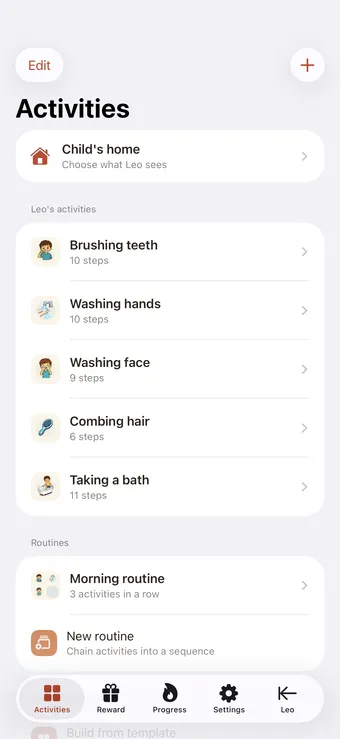
    Open Activities and add a new one

    From the parent area, open Activities and tap to add. Every activity is a small, self-contained task — like brushing teeth or getting dressed.
    Open Activities and add a new one
  2. 2

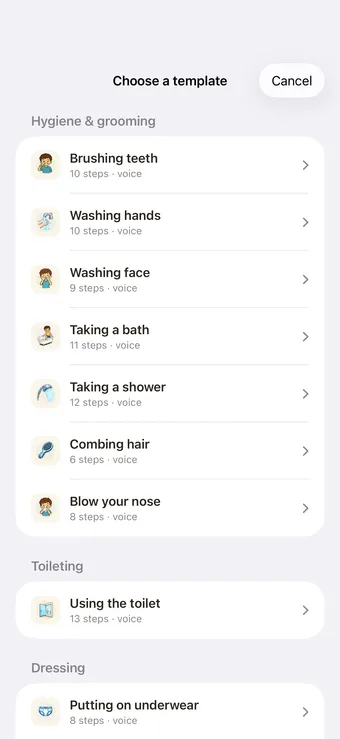
    Start from a ready-made template

    Pick a task-analysed activity that's already broken into small steps — hygiene, dressing, eating and more. It's the fastest way to start; you can change everything later.
    Start from a ready-made template
  3. 3

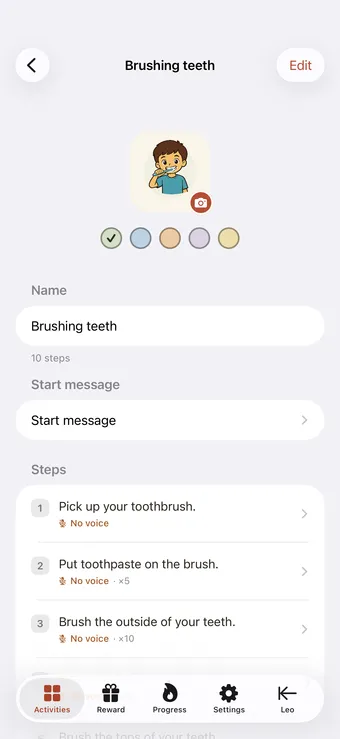
    Adjust the steps to fit your child

    Add, remove, reword or reorder steps so they match how your child actually does the task. Swap in your own photo for a step if it helps it feel familiar.
    Adjust the steps to fit your child
  4. 4

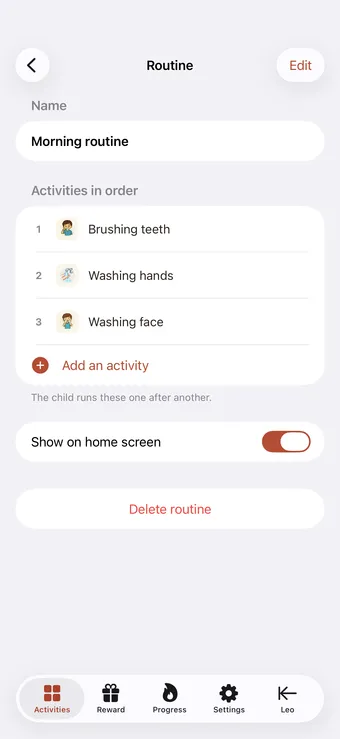
    Group activities into a routine

    A routine strings activities together — for example a morning routine of getting dressed, then breakfast, then teeth. Your child moves from one to the next with a clear 'what's next'.
    Group activities into a routine
  5. 5

    Choose what your child sees

    Curate the child home screen so only today's activities show. Less on screen means less to overwhelm — your child sees exactly what to do now.
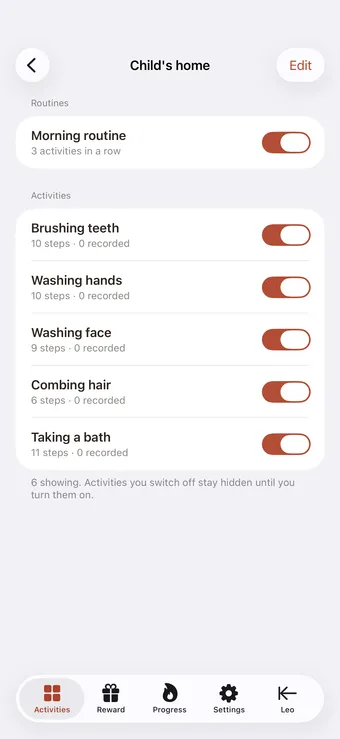
    Choose what your child sees

Setting up the first routine is the moment Tandli goes from an idea to something your child actually uses. Keep this first one small — three or four steps of a task they do every day, like brushing teeth or getting dressed. A short routine that works beats a long one that overwhelms, and you can always add more once it’s part of the day.

Frequently asked questions

Do I have to use the ready-made templates?

No. Templates are just a fast starting point — every step is fully editable, and you can build an activity from scratch. Use as much or as little of a template as you like.

What's the difference between an activity and a routine?

An activity is a single task broken into steps (like brushing teeth). A routine chains several activities together in order (like a whole morning). You can use activities on their own or build them into routines.

Can I change a routine after I've made it?

Yes — everything is editable at any time. Reorder activities, add or remove steps, change pictures, and adjust what shows on the child's home screen whenever you need to.

Ready to try it yourself?

Tandli is on the App Store. Download it free and start your 14-day trial today.

Download on the App Store

Free download · 14-day free trial · iPhone, iOS 26 or later