Record each step in your own voice
Short answer
Step by step
- 1
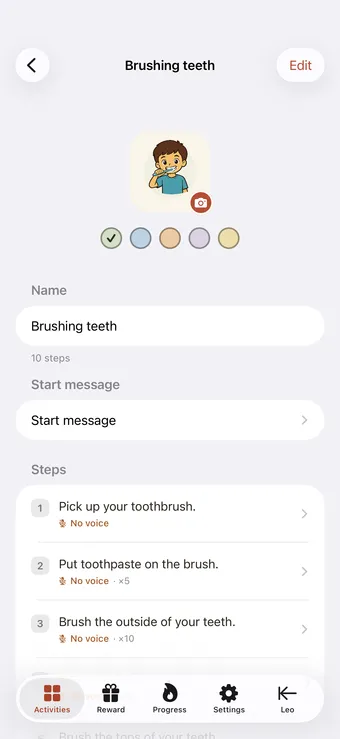
Open an activity and tap a step
In the parent area, open the activity you want and tap the step you'd like to voice. You can record as few or as many steps as you like.
- 2
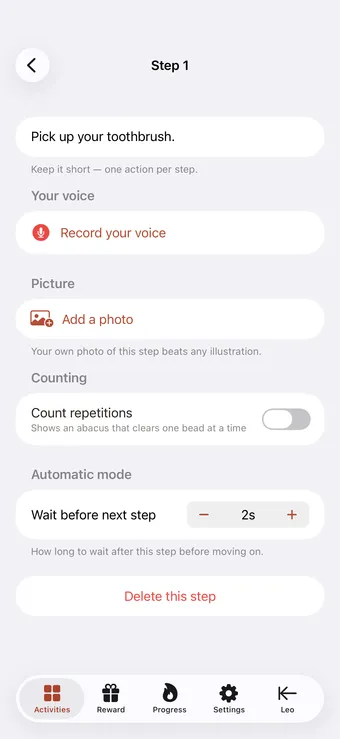
Open the step's detail
Each step has its own screen where you set the picture, the wording, and the recording. This is where your voice gets attached to that exact step.
- 3
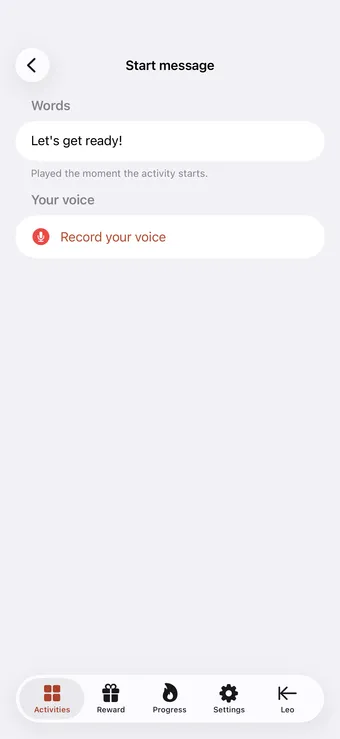
Record your prompt
Tap record and say the prompt the way you'd say it out loud — 'Now we put toothpaste on the brush.' Keep it short and warm. Play it back and re-record until it sounds right.
- 4
Skip a step and the built-in voice covers it
Don't have time to record everything? Any step without a recording is read aloud by a clear built-in voice in your language — so your child always hears the instruction.
Your voice is the part of Tandli that a text-to-speech app can’t copy. For many autistic and neurodivergent children a familiar voice is regulating — it lowers anxiety and makes an instruction feel like support rather than a demand. You don’t need a studio or a perfect take; the warmth and familiarity are what matter.